
Vehicle Spy 3 Enterprise Plus
Vehicle Spy Enterprise Plus with Preferred Support (phone and priority email response).Perpetual license with one year of Preferred Support and software updates.Additional support and updates available.
At a glance
- CompatibilityVehicle Spy Enterprise Plus with Preferred Support (phone and priority email response)
- Key interfacesSee Specifications tab
- Included itemsNo bundled accessory list provided
- Lead timeContact sales for current lead time
- Country of originUS
Vehicle Spy Enterprise Plus Software -- Perpetual neoVI Locked license, includes one year of upgrades and Priority e-mail/phone tech support.
Vehicle Spy Enterprise Plus includes everything the Enterprise version of Vehicle Spy plus support for Fuzz Features.
Please visit the Vehicle Spy webpage for the most up to date information.
Vehicle Spy 3 Enterprise Plus is a single tool that enables you to perform CAN Fuzzing, diagnostics, node/ECU simulation, data acquisition, automated testing, memory edit/calibration, and vehicle network bus monitoring. Vehicle Spy is designed with one thing in mind: your productivity; it was created to be easy to use, with a low learning curve. Except for certain customer-specific features, all the functionality available in Vehicle Spy Enterprise is offered at a single low price.
Supported Networks:
- Automotive Ethernet
- AVB/TSN
- FlexRay
- A2B
- wBMS
- CCP/XCP
- CAN
- CAN FD
- LIN
- J1939 Transport
- RP1210 (compatible with all Intrepid Hardware)
- J2534 (compatible with all Intrepid Hardware)
- Ethernet PHY Dashboard
Message Database Support:
- ARXML
- VS3
- DBC
- UEF
- LDF
- ODX
- ODI
- VSDB
- VS3DB
Applications:
-
CAN / CAN FD Fuzzing - Many cybersecurity trainees get their first exposure to Vehicle Spy by creating some function block scripts to fuzz on CAN or otherwise brute-force potential diagnostic requests. Vehicle Spy Enterprise Plus introduces a full-feature CAN fuzzing tool, implemented to perform OEM-level pen test/vuln testing functions using easy to use interface. Watch our video to learn more.
-
Automotive Gateway Builder - Create network gateway for automotive ethernet in minutes using Vehicle Spy 3 Gateway Builder. Allows you to simply drag and drop one vehicle network to another network. This feature allows you to modify messages between modules, route messages, and even build a new custom message from an existing signal. Gateway Builder supports CAN to CAN, CAN to LIN, CAN to CAN FD, CAN to Ethernet and Ethernet to CAN, etc.
-
Remote Over-The-Air (OTA) ECU and Fleet/Test Vehicles Flashing - Flasher view will allow engineers to configure and flash multiple ECUs simultaneously through the vehicle’s CGM using Vehicle Spy. This feature is not limited to vehicles; it can also be used on other test properties that use a CGM as part of their setup.
-
Video Tracking - Samples incoming video stream from vehicle network, IP cameras or webcam Automate tests and capture errors Identify needle positions, warning messages, and more.
-
Bus Monitoring: Vehicle Spy’s bus monitoring functionality allows you to view, save, and analyze message traffic from multiple networks simultaneously, including CAN, LIN, Automotive Ethernet Raw, IP, UDP, TCP, DoIP, XCPoE and other supported networks. Industry standard .DBC and .LDF files are supported, as well as .UEF. We also offer a free LDF tool.
-
Simulation: Vehicle Spy has long supported ECU or network node simulation (often called restbus simulation) and can be used together with Graphical Panels and Scripting to create setups for customer-specific functionality. Playback Function Blocks can also be used to replay prerecorded CAN, LIN or other network traffic back onto a live bus.
-
Data Acquisition: Data logging with real-time signal views and post-analysis of data files provides you with a complete data acquisition and analysis solution. We also offer standalone embedded data logging hardware.
-
Diagnostics: Whether you are using J1939, GMLAN, ISO 14229 or your own custom diagnostic protocol, you can set up and execute custom scripts and diagnostic jobs with custom Graphical Panels to perform nearly any diagnostic task. Scripts written in Vehicle Spy’s Function Block language can also be downloaded to our real-time embedded hardware and executed in real time. Support for industry standard .ASAP2 and .ODX files is included. Be sure to check out our free ODX viewer.
-
Memory Edit / Calibration: Vehicle Spy contains all of the functionality you need for editing your ECU’s memory using the CAN Calibration Protocol (CCP) or Universal Measurement and Calibration Protocol (XCP). Support is provided for ASAP2 (A2L) files, as well as memory edit controls for Values, Curves, and Maps. A complete ASAP2 file creator is also included with Vehicle Spy.
Vehicle Spy 3 Basic is meticulously organized into panels and views, allowing for swift navigation between functions. Here are some commonly used views and panels:
-
Messages View: See all messages on all active buses and signals within them. Some key features of Messages View are fast filtering and activity highlighting.
-
Messages / Database Editor View: Vehicle Spy includes a built-in database and message editing facility. To create or edit messages you can go to the Messages Editor and make the necessary changes to messages and signals; this can often be done while Vehicle Spy is left online.
-
Transmit Panel: Transmit any kind of message manually, or set up a periodic transmission rate. Expressions can also be entered to automatically change the data in a transmit message.
- Graphical Panels: Create a custom user interface to view bus data the way you need it, transmit messages, and interact with scripts and other parts of Vehicle Spy.
- Signals List: Display the latest values of a list of selected signals.
- Post Analysis: View CAN, LIN, or other network signals along with raw message data, analyze events and data values and patterns.
- MEP Setup: Select an ASAP2 (A2L) file for CCP or XCP and set up options for calibration. Interact with lists of ASAP2 Maps, Curves, Values and Measurements.
- Function Blocks: Function Blocks use a simple mouse-driven step-by-step language to allow Vehicle Spy to be easily scripted even by those with no background in programming. These scripts can also be downloaded to our network adapters and data loggers for real-time execution. Standalone scripts run without the need for a PC and can be used for message gatewaying, handheld flashing, data logging, and much more.
- Diagnostics Setup: Built-in diagnostics support enables you to set up and execute diagnostic jobs and save your results for later analysis.
Discover more about the different versions of Vehicle Spy 3 at IntrepidCS Website
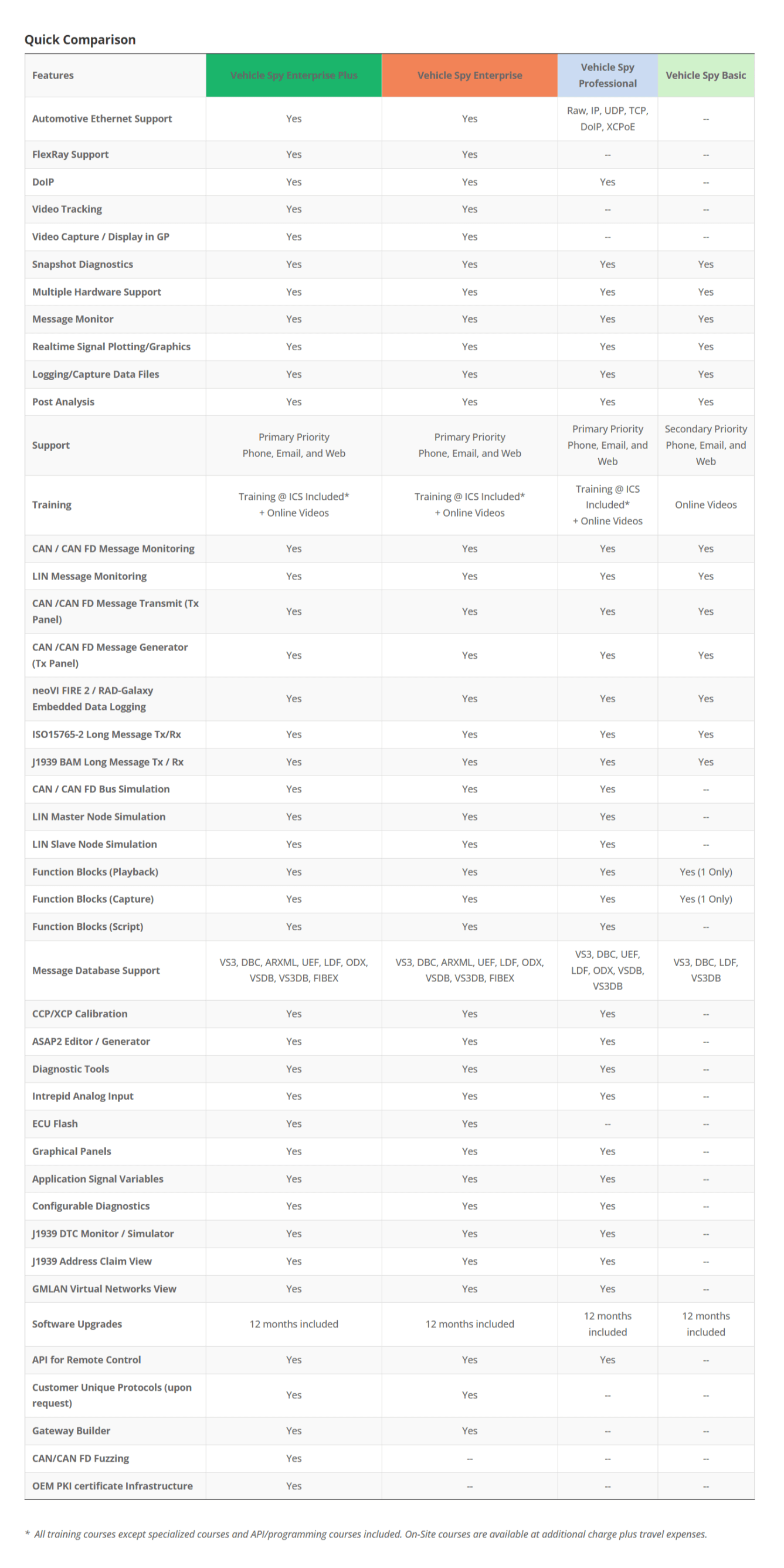
To view our full details comparison chart please click here.
PC System Requirements:
| Unit of Measure | EA |
|---|---|
| Country of Origin | US |